 NibNotes
You show up. The notes write themselves.
NibNotes records and writes up every meeting right on your own computer. No bot joins the call, so nobody sees a note-taker in the room, and the recording never leaves your machine.
For people who take their own meetings: consultants, founders, small teams.
macOS 14.4 or later · Windows 10/11 · auto-updates
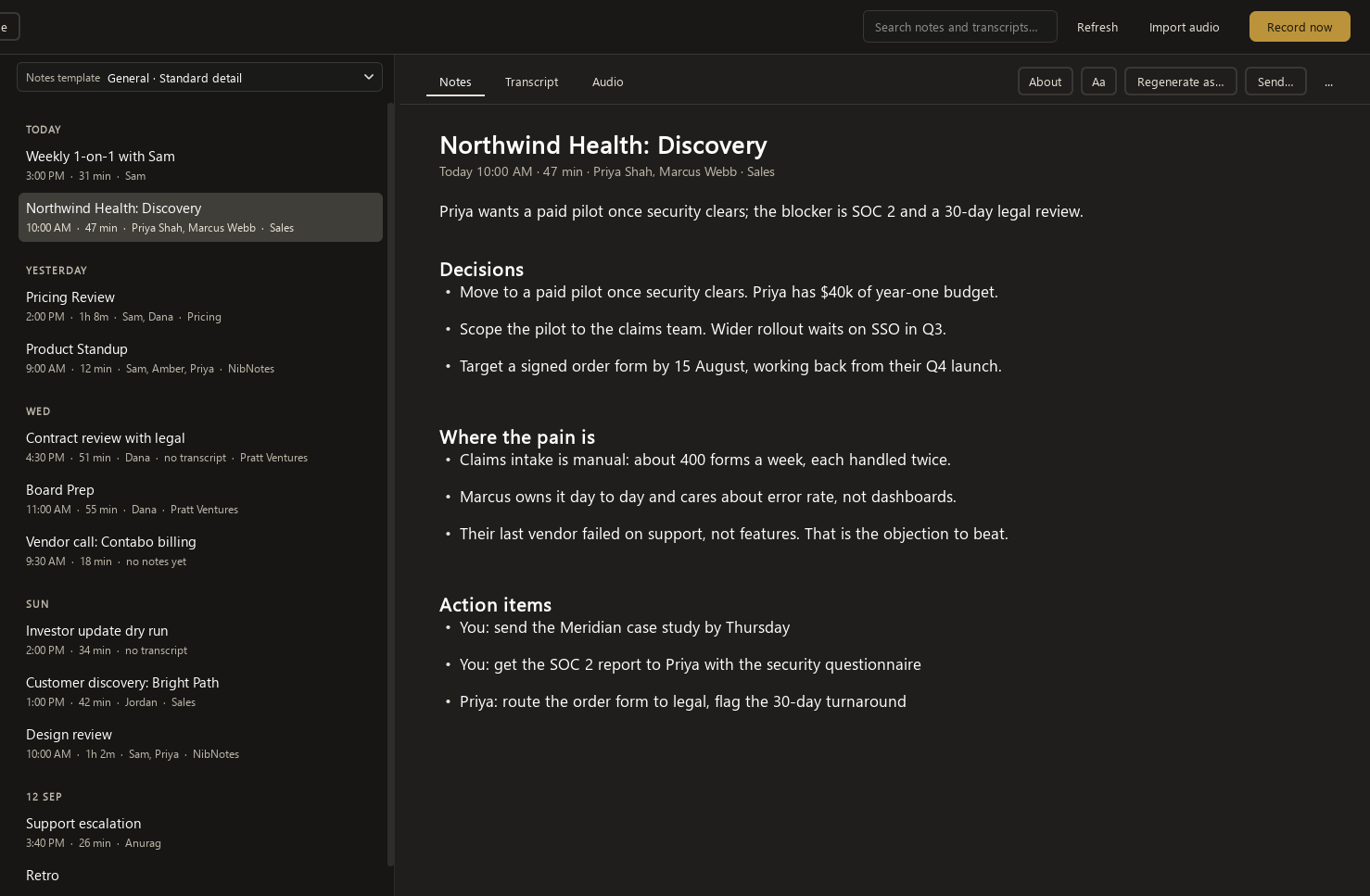
See it work.
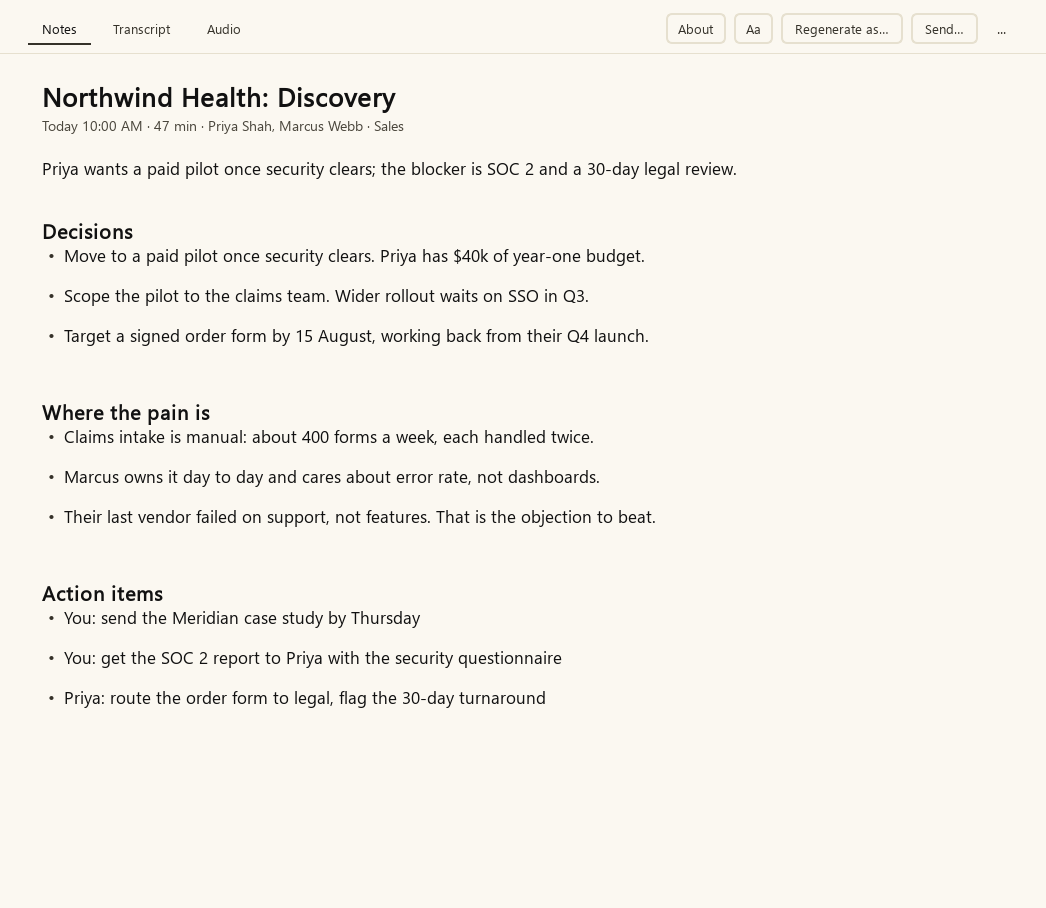
Every call ends as a finished document
A short summary of what was decided and why, the decisions, and the action items with the owner attached. A few minutes after you hang up it is saved to a folder on your computer as a Word file, Markdown, or plain text.
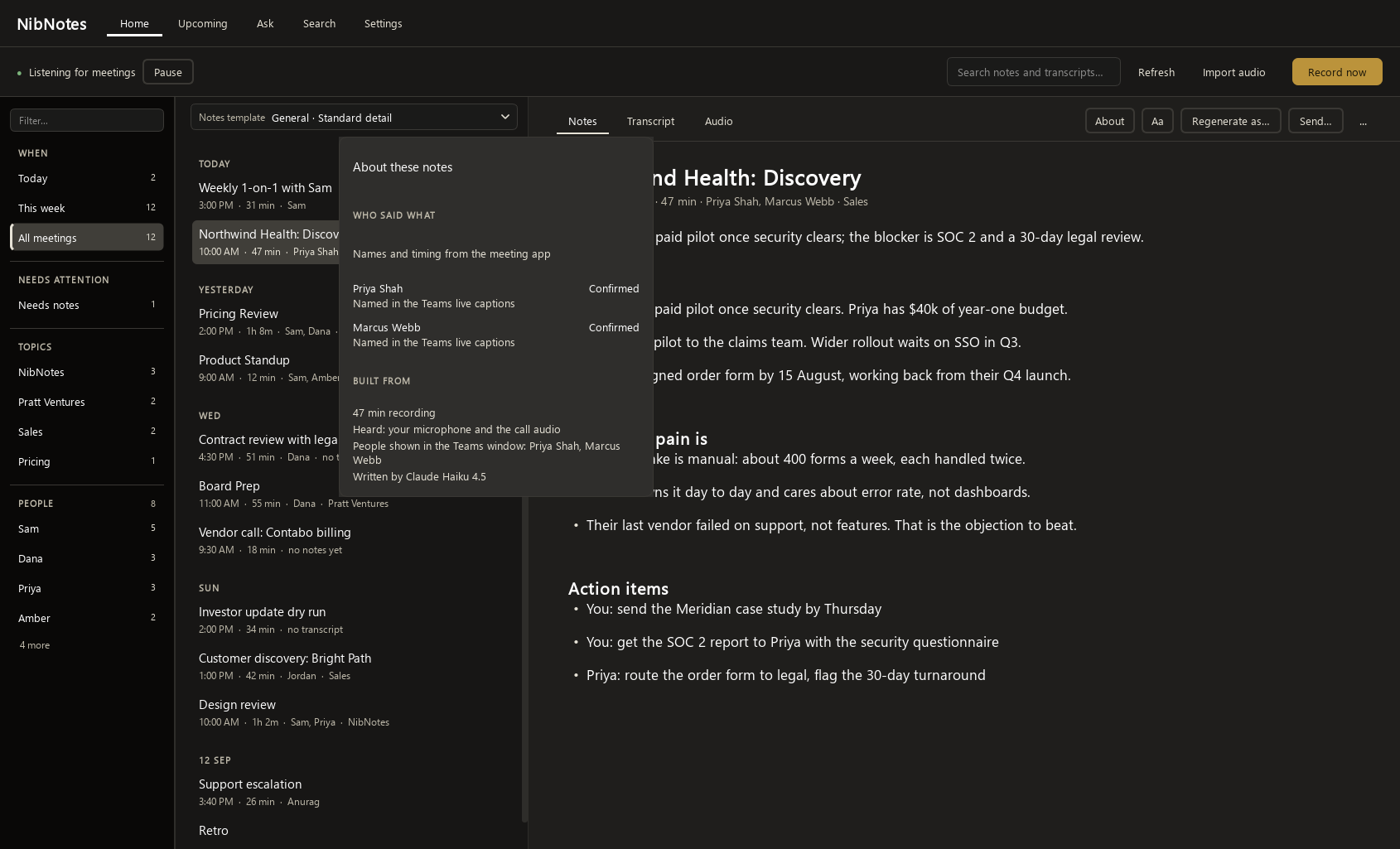
Who said what, and how it knows
Your side is always you. The other voices are told apart on your computer and named from the meeting app's participant list, its live captions when they are on, and what was said. The About card on every note shows how each name was reached.
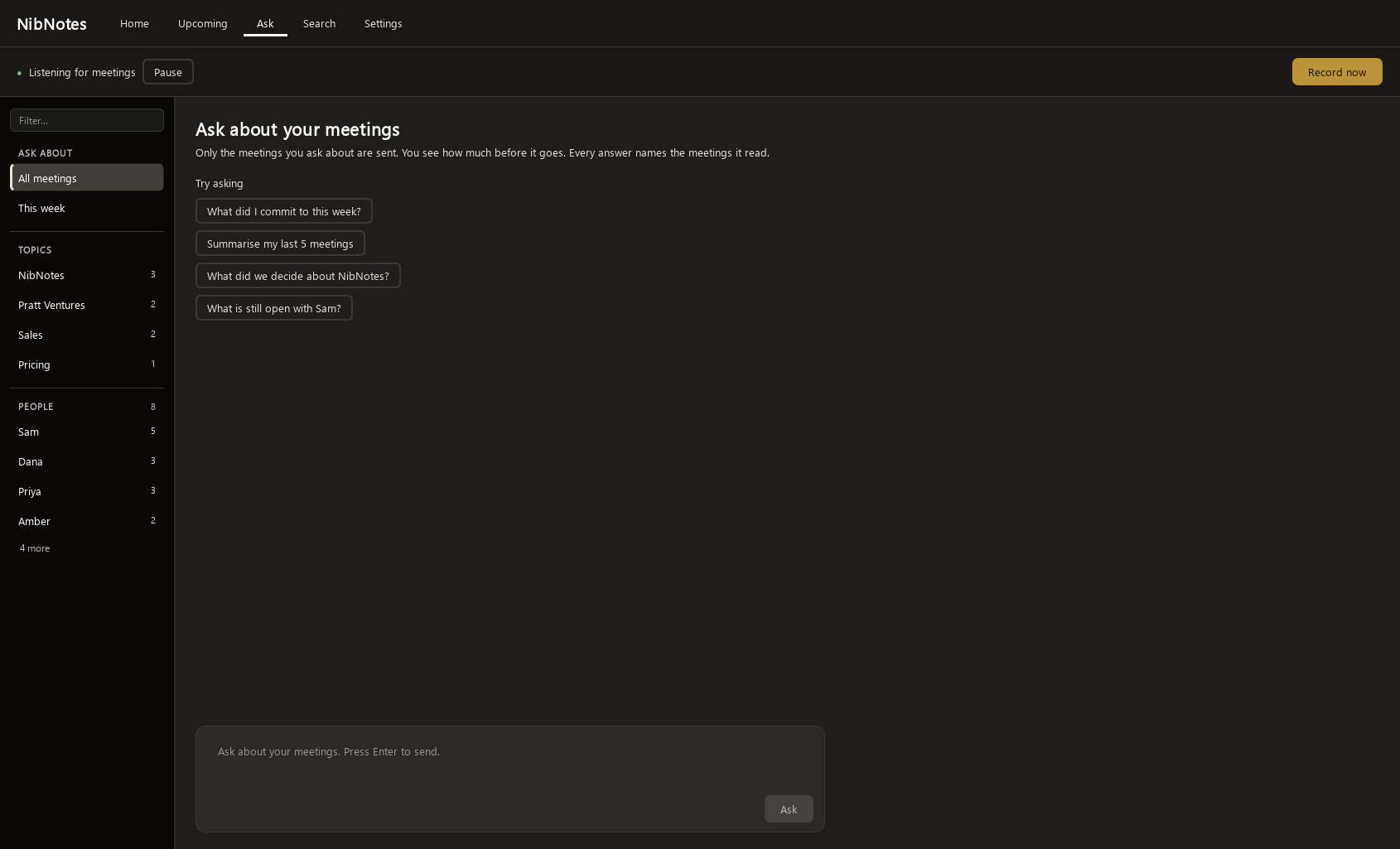
Ask across your meetings
Ask a question over your whole meeting history: what you committed to this week, what was decided about a project, what is still open with someone. Only the meetings you ask about are sent, you see how much before it goes, and every answer names the meetings it read.
Nothing to launch, nothing to remember.
It spots the meeting, records it, and writes it up. You approve each app once.
It's already there
NibNotes sits quietly in the system tray or menu bar (the little icons by your clock) and waits for a meeting to begin. There's nothing to open and nothing to configure.
It hears both sides
When your mic goes live in Zoom, Teams, Meet, Slack, or any other call, NibNotes asks the first time you use that app. After that it just records, capturing the whole conversation from your computer's own audio.
Then it writes it up
As soon as you hang up, the notes start writing. A few minutes later there's a summary, the action items, and a transcript you can search.
Your meetings stay on your computer.
Recording and speech-to-text run on your own machine. Here is exactly what stays and what leaves.
Stays on your computer
- The recording. No bot joins and no audio is ever uploaded. Kept for a week by default, and you choose how long.
- The transcript. Speech-to-text runs on your machine. Kept for two weeks by default, so you can reread it or re-run the notes.
- Your notes. Saved as files in a folder you control. We cannot read them.
- Voice matching. Telling voices apart happens on your computer and is discarded after each meeting. Nothing about how anyone sounds is stored or sent.
Leaves, and why
- The transcript text goes to the AI that writes the notes: Claude by default, through OpenRouter, under no-training and zero-retention terms. Never the audio. Point NibNotes at an AI on your own machine and no transcript leaves either.
- Your email and payment go to us, to run your license. That is all our servers ever touch.
- Nothing else. Every request the app makes is listed in its network log, inside the app.
Pull your internet out mid-meeting and the recording and transcript carry on. Writing the notes is the one step that needs a connection. The full privacy policy says the same thing in more words.
What NibNotes doesn't do.
It is a note-taker for your own meetings, on your own computer. So:
- No bot joins your call, and nothing appears in the participant list.
- No phone app. It runs on your Mac or Windows computer.
- No cloud copy of your meetings. We keep your email and license, nothing you recorded.
- No team workspace. Your notes are files; share them however you share files.
- No task tracker. Action items are written down, not managed.
Small touches that add up.
You approve each app once
The first call in Zoom asks; after that it records on its own, with Stop and Discard on the floating bar. The prompt gives you a line to paste in the chat so the room knows, and you can revoke any app in Settings.
Send it on
One click puts the finished notes in an email, ready for whoever wasn't there.
Jot notes as you go
Type your own notes on the floating bar mid-call, and they're folded into the write-up.
Works in your language
English, Spanish, French, German, Portuguese, Italian, Dutch, Japanese, Korean, Chinese, Russian, Hindi and Arabic, or let NibNotes detect it. The notes come back in the language the meeting was in.
Calendar titles
Paste your Outlook or Google calendar link once (on a Mac, NibNotes can read your Calendar app), and every meeting gets named from the event.
A brief before the call
Press Prepare on an upcoming meeting and get what was said last time, what people said they'd do, and what is still open, from your own earlier notes. Each point names the meeting it came from.
Add a meeting by hand
Give it a title, a date and who was there, then add a recording, a transcript file or your own notes, and NibNotes writes it up. Or point it at a folder of phone recordings.
Your notes, on your other computer
Your meetings are ordinary folders of files. Point NibNotes at a folder inside OneDrive, Dropbox, Google Drive or iCloud and it moves them there, so the same library is on every computer you install it on. Record on one computer at a time.
Tell it what the brief should cover
Press Prepare brief and NibNotes ticks the earlier meetings it thinks are related. Change them, pick Short, One page or Detailed, and say anything it should focus on. It shows what it will send before it sends it, and you can save the brief as a file or put it in an email.
A calendar, without an account to connect
On a Mac NibNotes reads the calendars your Mac already has, including iCloud, Google and work accounts. On Windows it can read the Outlook app you already have open. Otherwise you paste a private calendar link, and NibNotes shows you where to find yours. If your workplace blocks publishing, a calendar file on your computer works too. A pasted link is updated by your calendar provider on its own schedule, often every few hours, so the two routes above pick up a change sooner.
Say what the notes got wrong
If a write-up misses something or gets it backwards, tell NibNotes what to change and it writes the notes again with that in mind. You can also rewrite a meeting in a different template.
You decide what is kept
Recordings and transcripts are deleted on a schedule you set: off, one week, two weeks, one month, three months, or kept forever. Recordings go after a week and transcripts after two unless you change it. Your notes are never deleted.
Recordings from your phone
There is no NibNotes phone app. Record with the voice recorder you already have, let it sync into a folder, and point NibNotes at that folder. It transcribes each new recording and writes it up, and never moves or deletes your original.
A template per meeting
Templates for one-on-ones, sales calls, standups, interviews, or your own.
Search, ask, replay
Full-text search across every note and every transcript you've kept, questions answered across your whole history with sources, and, while a meeting's audio is kept (a week by default), any transcript line played back with one click.
Pricing
a year. Renews until you turn it off.
once, for lifetime.
Built-in AI notes use AI credit, which is separate. You get $5 of credit when you sign up, one time only. After that, you add credit when you need it, $5 to $50 at a time. Or use your own AI key and pay that provider directly.
- Free for 14 days. You add a card to start and nothing is charged that day. On day 14 your card is charged the plan you chose: $29.99 for the year, or $99.99 once for lifetime. Cancel in the app before then and you are not charged at all.
- AI credit is separate from the plan. You get $5 of credit when you sign up, one time only. Writing up an hour-long meeting uses about 12 cents of it, so that is roughly 40 meetings. Regenerating notes and asking questions use credit too. After that, add any amount from $5 to $50 when you need more, or switch on auto top-up.
- Or connect your own AI key (OpenAI, Anthropic, OpenRouter, Groq, or your own server) and pay that provider directly. NibNotes charges nothing extra for it.
- The yearly plan renews every year until you turn renewal off in the app or online. You keep NibNotes until the end of the year you paid for. When a yearly plan ends, recording and new notes stop, and every note stays in your notes folder. You can move from yearly to lifetime for $70 at any time.
- Each charge is final once made, except where a refund is required by the law that applies to you. We email you before every yearly renewal.
- If you bought NibNotes before 21 September 2026, you have a lifetime license. Nothing changes for you.
Questions
Does a bot join my meeting?
No. NibNotes records your microphone and the sound your computer plays. Nothing is added to the meeting, so the other people see the meeting as usual.
Where are my recordings kept?
In a folder on your computer. Recording and transcription run on your computer, and the audio is never uploaded.
What is sent to the AI?
The text of the transcript, to write the notes. Never the audio. Every request is listed in the app's network log.
Which meeting apps does it work with?
Zoom, Microsoft Teams, Google Meet, Slack, Webex, and any call that plays through your computer, including a call on your headset.
Do I need to be online?
Recording and transcription work offline. Writing the notes needs a connection, unless you point NibNotes at an AI running on your own computer.
How long until the notes are ready?
A few minutes after the call ends. Transcription runs on your computer, so a long meeting on an older laptop takes longer.
What does it cost?
14 days free with a card on file, then $29.99 a year, or $99.99 once for lifetime. AI credit is separate: you get $5 when you sign up, one time only, roughly 40 hour-long meetings. More credit is any amount from $5 to $50, plus a service and processing fee (the fee is smaller on larger amounts). Or use your own AI key at no extra cost from NibNotes.
How do I cancel?
During the 14 days, cancel in the app and nothing is charged. On the yearly plan, turn off renewal in the app (Settings > Account & billing) or from the link in any renewal email. You keep NibNotes until the end of the year you paid for. You can also do either online. Each charge (the first charge, each yearly renewal, the lifetime charge and an upgrade to lifetime) is final once made, except where a refund is required by the law that applies to you. We email you before every yearly renewal, and turning renewal off before the renewal date means you are not charged for the next year.
What happens if my yearly plan ends?
Recording and new notes stop. Every note, transcript and recording you already have stays in your notes folder, readable as ordinary files. Renew any time to pick up where you left off.
Can I switch from yearly to lifetime?
Yes, for $70, any time, in Settings > Account & billing. Your plan then stops renewing. AI credit stays separate.
I bought NibNotes for $29.99 before. What changes?
Nothing. If you bought NibNotes before 21 September 2026, you have a lifetime license. Nothing changes for you.
Can I use my own AI key?
Yes. Connect your own key and no credits are used. NibNotes charges nothing extra for it.
What computers does it run on?
macOS 14.4 or later, and Windows 10 or 11. 4 GB of RAM and 2 GB of free space. It updates itself.
Walk out of your next meeting with the notes already done.
Direct download · Windows 10/11 · Mac (macOS 14.4+) · 4 GB RAM, 2 GB free space · auto-updates. The Windows installer is signed and the Mac app is notarized by Apple.
Made by Pratt Ventures LLC, a one-person company in Utah. Questions go to [email protected] and are answered by the person who built it.